
Modify the grid#
Change the grid type, model dimensions, and spatial refinement, then inspect the generated deck before running an expensive simulation.
Configure a Cartesian grid#
Copy the SPE11B configuration and modify these variables:
grid = "cartesian"
dims = [8400.0, 1.0, 1200.0]
x_n = [420]
y_n = [1]
z_n = [60]
cartesianUses one cell count in each direction.
tensorUses refinement arrays to divide each direction into regions.
corner-pointUses lateral refinement arrays and an 11-entry or 18-entry
z_narray for the geological levels.
Generate and inspect the deck#
pyopmspe11 -i modified_grid.toml -o modified_grid -m deck
Inspect the generated grid before running Flow. When ready, reuse the existing deck and generate benchmark data:
pyopmspe11 -i modified_grid.toml -o modified_grid -m flow_data
Result#
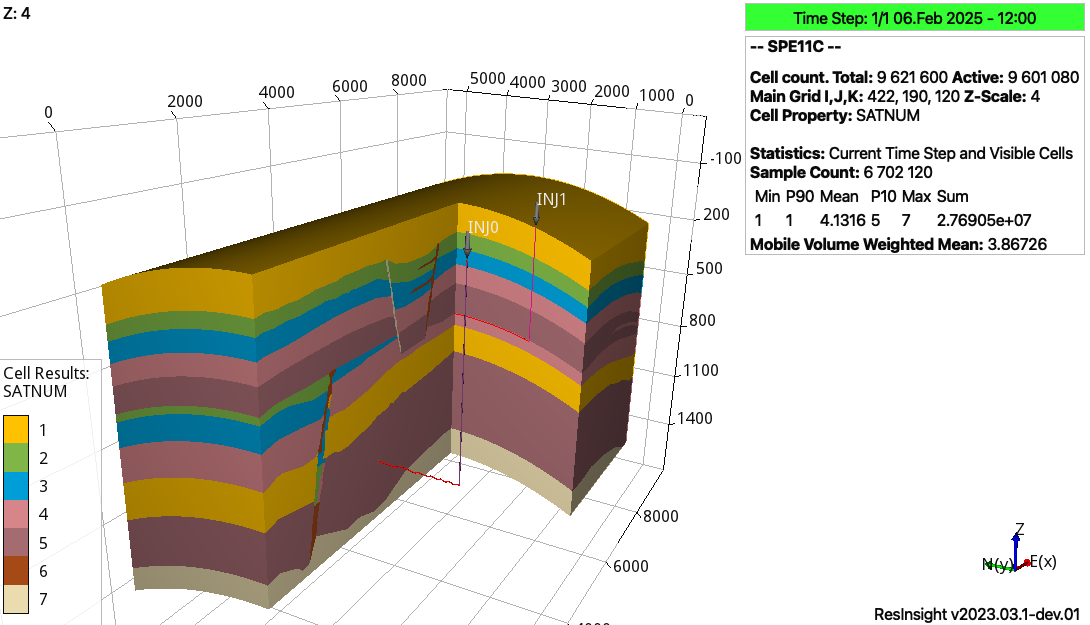
Facies generated for an SPE11 corner-point grid.#
Next#
Continue with Compare results. See Corner-point grids with 11 and 18 levels for a comparison of 11-level and 18-level corner-point grids, and use Configuration reference for exact variable definitions.