Initial Configuration
Install OPM Flow
You need at least version 2025.04 of OPM Flow installed to use it with ResInsight.
Follow the OPM Flow installation instructions here.
Windows support
To be able to run OPM Flow on your Windows computer, you need to first install WSL.
A guide for installing WSL and OPM Flow can be found here.
ResInsight setup
ResInsight needs to know where to find the OPM Flow executable. To do this, open the ResInsight preferences:
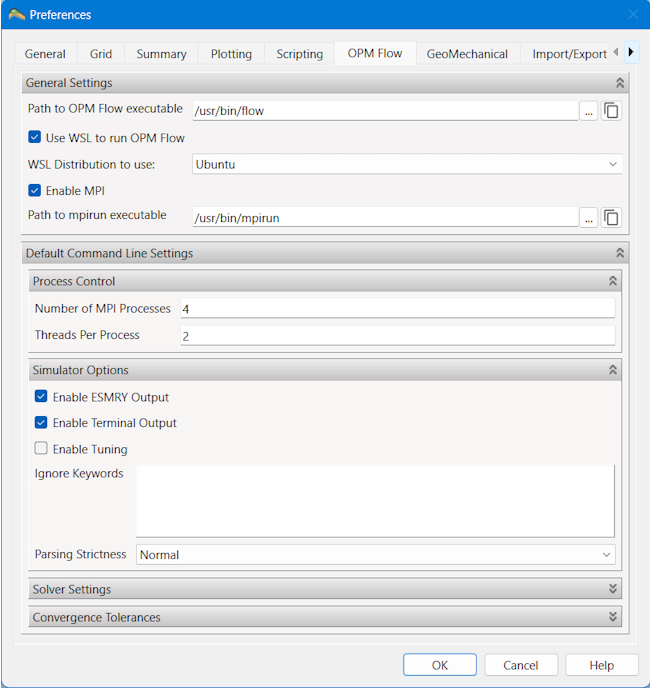
Path to OPM Flow Executable: Enter the full path of the flow executable. Do not add any extra parameters here. If you use WSL, it is the full path inside the WSL instance you enter here.
Use WSL to run OPM Flow: (Windows only) Turn this option on if you want to run OPM Flow using WSL on Windows. In case you have multiple WSL distributions installed, select the one you have flow installed in.
Enable MPI: Turn this option on if you want to run OPM Flow in parallel using MPI. You need to enter the full path to the mpirun executable you want to use. Do not add any extra parameters here. If you use WSL, it is the full path to mpirun inside the WSL instance you enter here.
Default command line settings: This is where you define the command line parameters you want ResInsight to pass on to OPM Flow. The settings in this section will be the default settings for any new OPM Flow job you create in ResInsight. The settings can be overridden in a particular job, if needed.
NOTE: If you change anything in this section, existing jobs will not be updated. The new settings will only be used by any new jobs you create.
Process Control: Here you can specify the number of MPI processes to run in parallel if MPI has been enabled. You can also adjust the number of threads each process is allowed to use. Using more processes and threads could increase the performance of OPM Flow, but only to certain extent.
Refer to the OPM Flow manual for a description of the remaining parameters.