Ensemble jobs (BETA)
NOTE: This functionality is still under development and might change in upcoming releases.
Overview
Just like a single OPM Flow job could be created from a grid case, an ensemble job can be created from an existing grid ensemble loaded in ResInsight.
Right-click an existing grid ensemble in the 3d view project tree, and choose “New Ensemble Job…”
A new job will show up in the Scripts/Jobs explorer, with a default name equal to the selected grid ensemble.
Ensemble Job Properties
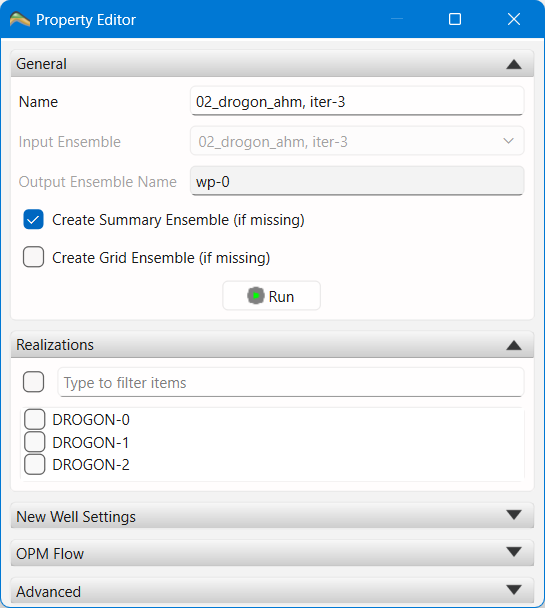
When the ensemble job is selected, the ensemble job property editor will be shown:
Name - The name to identify this job.
Input Ensemble - The name of the input ensemble used for this job. Read only, set when the job was created.
Output Ensemble Name - The name used for the output ensemble created when running the job. The output ensemble will be created in the same folder structure as the input ensemble, but using the name shown here for the iteration name. The number used in the name can be changed in the Advanced group at the bottom of the properties editor.
Create Summary Ensemble - If checked, ResInsight will automatically load the results from the job as a new summary ensemble, or refresh the existing ensemble if one already has been created.
Create Grid Ensemble - If checked, ResInsight will automatically load the results from the job as a new grid ensemble, or refresh the existing ensemble if one already has been created.
Realizations - Choose which realizations from the input ensemble ResInsight should run an OPM Flow simulation for.
New Well Settings Group
The Add a new well page describes how to use these settings. The same settings are used for all realizations.
The OPM Flow settings are the same as for a single OPM Flow Job..
Running an Ensemble Job
To run the job, click the Run button, or right-click the job and choose Run….
ResInsight will create an OPM Flow job for each selected realization and run those. Depending on the batch scheduler setup, ResInsight will run one or more sub-jobs in parallel on the local computer, or submit the sub-jobs to a cluster.
Once all sub-jobs have completed, ResInsight will automatically load/refresh the results, if selected by the user.