Observed FMU RFT Data
Observed RFT data from an FMU run can be imported and displayed in an Ensemble RFT Plot.
Import
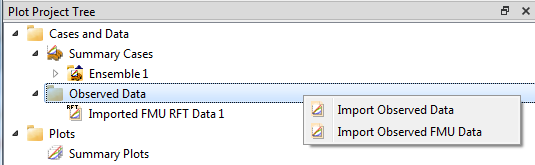
Right-click Observed Data in the Plot Project Tree and select Import Observed FMU Data. Then select a folder. Observed FMU data is imported from the folder and its subfolders.
The folder is expected to contain the following files:
well_date_rft.txt– well measurement dates<well_name>.obs– observed pressure and error<well_name>.txt– position and reservoir zone of each observationlayer_zone_table.txt– correlation of grid k-layers and formations
Note
The data file well_date_rft.txt is required. If missing, no Observed FMU data will be imported.
File Formats
Correlation of Grid and Formations
The file layer_zone_table.txt can be used to correlate each grid k-layer with a formation name.
This file is identical for all cases in the same ensemble. See FMU Layer Zone Table for the file format.
Observed Pressure and Error
For a given well name, the file <well_name>.obs is a data file containing two columns to specify observed pressure and error.
Column one contains observed pressure and column two contains error. The observation data is valid for one and only one layer/formation.
Example file for well OP_1, i.e. OP_1.obs:
Multiple Observations for a Well
If there are multiple observations for a well at different dates, the naming of the files include a measurement ID.
Example file well_date_rft.txt:
Measurement ID is the last column. The corresponding observations files are named as follows, the measurement ID is appended to the well name.
Reservoir Zone Name
For a given well name, the file <well_name>.txt is a data file containing five columns that specify its correlation with reservoir zones.
Each line of data must contain:
- Utmx: x-coordinate in UTM
- Utmy: y-coordinate in UTM
- Measured Depth relative to the Kelly Bushing (MDRKB)
- True Vertical Depth referenced to Mean Sea Level (TVDMSL)
- Reservoir zone name
Example file for well OP_1, i.e. OP_1.txt:
Well Measurements - Date Format 1
The data file well_date_rft.txt contains well measurements. The file contains five columns for each well measurement:
- Well Name
- Date in two digit form <DD>
- Month in two digit form <MM>
- Year in four digit form <YYYY>
- Measurement index
There can be multiple measurement for each well.
Example file well_date_rft.txt:
Well Measurements - Date Format 2
The data file well_date_rft.txt contains well measurements. The file contains three columns for each well measurement:
- Well Name
- Date on the format <YYYY-MM-DD>
- Measurement index
There can be multiple measurement for each well.
Example file well_date_rft.txt: